

We manage CQLS user mail lists in Outlook distribution lists. Outlook allows users to subscribe and unsubscribe from a given list through a web interface. You may join or leave a list or contact us to be added to a list. If you don't have an OSU email and would like to be added to one of our lists, contact us to join.
Mail will be moderated, meaning that someone at the CQLS will determine if the mail should be sent to the list or deleted.
Directions to Join or Leave an Outlook distribution list below table.
|
List Name
|
Description
|
|---|---|
| CQLS-BUG | Bioinformatics User Group |
| CQLS-community | CQLS and Core Lab notices, outages, presentations |
| CQLS-Microscopy | Confocal Microscope User List |
| CQLS-HTS | CQLS High Throughput Sequencing List (Illumina NextSeq 2000 and MiSeq sequencers) |
Directions to add yourself to a mailing list
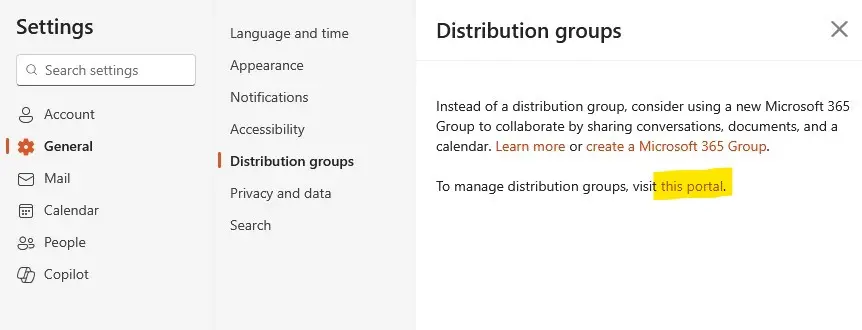
- Navigate to the following or follow link
- Outlook website > Settings > General > Distribution Groups > Portal
- Select Portal
-
Image
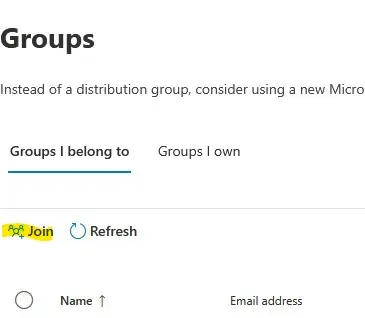
- Under Groups I belong To, select Join
-
Image
- A list will appear with possible lists to join
-
Image

- Search for CQLS list in the search field,
- Type CQLS, press Enter in the search box.
- Select the list and click JOIN.
-
Image

- One of us will add you to the list and you'll get a notice in about a day.
Directions to Leave Mailing List
- Navigate to the following or follow link
- Outlook website > Settings > General > Distribution Groups > Portal
- Select Portal

- Under Groups I belong To, select the list you'd like to leave
- Join switches to Leave
-
Image

-
ImageClick Leave.
- You will be asked if "Are you sure you want to leave the group?"
- Click CONFIRM if you'd like to leave